
Your app calls the Notifuse API when a user asks to reset their password, and Notifuse sends them an email with the reset link your app generated.
Before you start
- A workspace with an email provider set for Transactional emails in Settings › Integrations. Without one, the Transactional page warns that notifications can’t be sent.
- A backend that creates the reset link (token, expiry, the page that checks it). Notifuse only delivers the link.
- Your workspace ID. It’s the ID you chose when you created the workspace, and it appears in the console URL after
/console/workspace/. - The address of your Notifuse instance, the same one you open the console on. The examples use
https://YOUR_NOTIFUSE_HOST.
Create the email template
Open Templates, click New template and pick the Password reset model in the Gallery. It already has a button and a plain-text copy of the link, both pointing to
{{ reset_url }}.Starting from a blank template works too. Set its Category to Transactional, because a notification only lists templates of that category.
The template can use two kinds of variables:
- The keys you send in
datasit at the top level. Write{{ reset_url }}, not{{ data.reset_url }}. - The contact is under
contact, for example{{ contact.first_name }}or{{ contact.email }}.
Hi {{ contact.first_name }},

<a href="{{ reset_url }}">Choose a new password</a>
Set the Subject and the Sender in the template settings, then save. See Templates for the editor and the test data used by the preview.
- The keys you send in
Create the transactional notification
Open Transactional and click New notification. Fill in:
- Name: what you’ll see in the console, for example “Password Reset Email”.
- API identifier: what your code sends, for example
password_reset. Lowercase letters, numbers and underscores only, 32 characters at most. It can’t change once the notification is created. - Email template: the template from step 1.
Click Create notification.
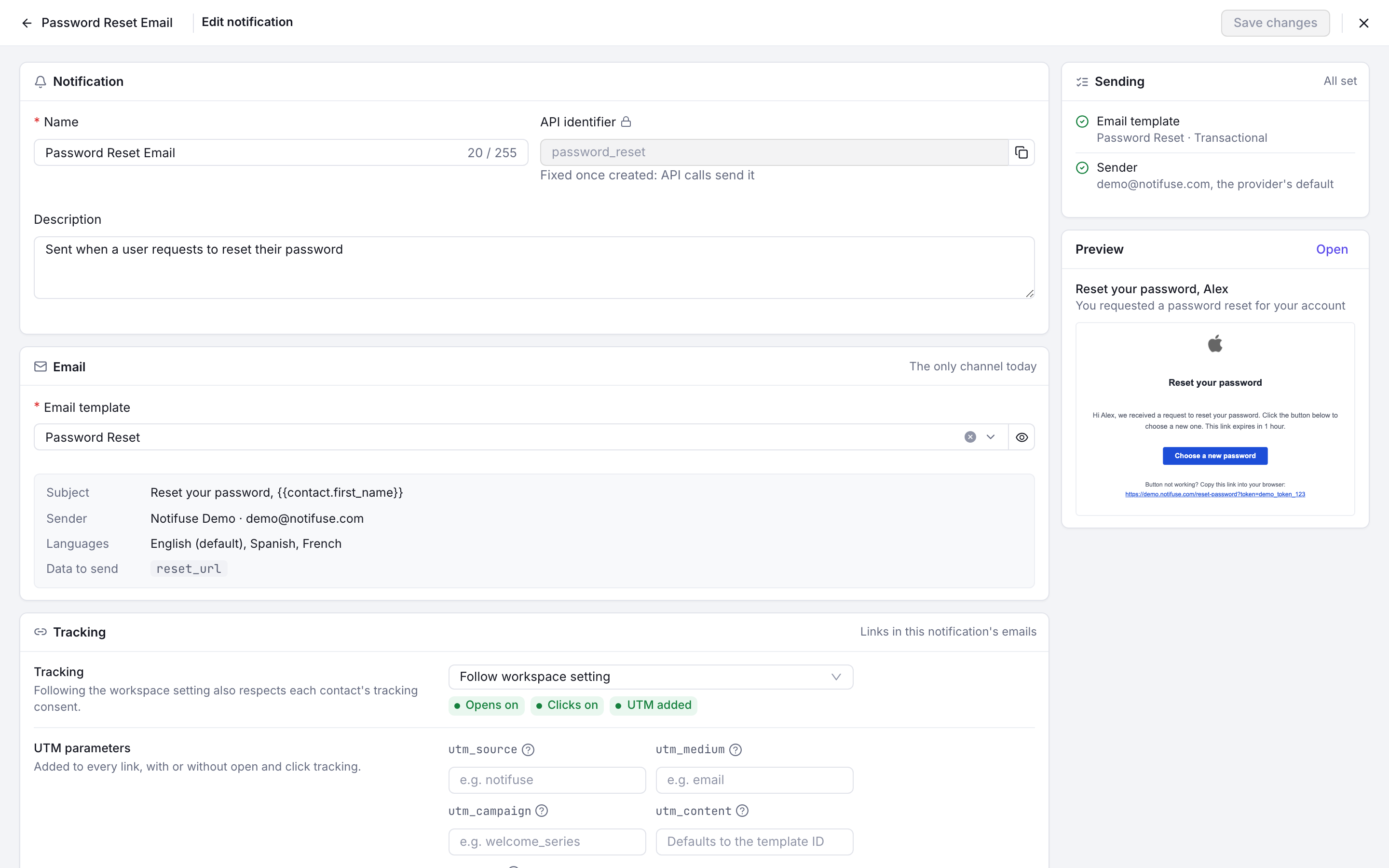
A transactional notification: its name, the fixed API identifier password_reset and its email template The notification’s page has an API call panel with a ready-made request in cURL, TypeScript and Python, and All languages shows more.
Create an API key
Go to Settings › Team & API keys and click Create API Key. Give it an API Key Name, such as “Backend password reset”.
Under Permissions, Transactional write is enough to send. A key with nothing else can send emails but can’t read or edit your contacts. If the console says custom permissions require a Notifuse Studio licence, the key can only have full access, and it works the same for this guide.
Click Create API Key and copy the token right away: it’s shown once and can’t be retrieved again. Store it in your backend’s secrets, never in browser code.
Send the email from your backend
Call
POST /api/transactional.sendwith the token as a bearer token. The body needs:workspace_id: your workspace ID.notification.id: the API identifier,password_reset.notification.channels:["email"]. At least one channel is required.notification.contact: the recipient, with at least a validemail.notification.data: the template variables, herereset_url.notification.external_id(optional): your own ID for this send, used to avoid duplicates. See the next section.
cURL
curl -X POST "https://YOUR_NOTIFUSE_HOST/api/transactional.send" \
  -H "Authorization: Bearer YOUR_API_KEY" \
  -H "Content-Type: application/json" \
  -d '{
    "workspace_id": "YOUR_WORKSPACE_ID",
    "notification": {
      "id": "password_reset",
      "external_id": "pwd-reset-u123-1700000000",
      "channels": ["email"],
      "contact": {
        "email": "user@example.com",
        "first_name": "Ada"
      },
      "data": {
        "reset_url": "https://app.example.com/reset?token=abc123"
      }
    }
  }'
Node.js
// Node.js 18 or later (built-in fetch)
async function sendPasswordReset(user, resetRequestId, resetUrl) {
  const response = await fetch('https://YOUR_NOTIFUSE_HOST/api/transactional.send', {
    method: 'POST',
    headers: {
      Authorization: `Bearer ${process.env.NOTIFUSE_API_KEY}`,
      'Content-Type': 'application/json'
    },
    body: JSON.stringify({
      workspace_id: 'YOUR_WORKSPACE_ID',
      notification: {
        id: 'password_reset',
        external_id: `pwd-reset-${user.id}-${resetRequestId}`,
        channels: ['email'],
        contact: { email: user.email, first_name: user.firstName },
        data: { reset_url: resetUrl }
      }
    })
  })

  const result = await response.json()
  if (!response.ok) {
    throw new Error(`Notifuse error ${response.status}: ${result.error}`)
  }
  return result.message_id
}
Python
import os
import requests

def send_password_reset(user, reset_request_id, reset_url):
    response = requests.post(
        "https://YOUR_NOTIFUSE_HOST/api/transactional.send",
        headers={"Authorization": f"Bearer {os.environ['NOTIFUSE_API_KEY']}"},
        json={
            "workspace_id": "YOUR_WORKSPACE_ID",
            "notification": {
                "id": "password_reset",
                "external_id": f"pwd-reset-{user['id']}-{reset_request_id}",
                "channels": ["email"],
                "contact": {"email": user["email"], "first_name": user["first_name"]},
                "data": {"reset_url": reset_url},
            },
        },
        timeout=10,
    )
    result = response.json()
    if not response.ok:
        raise RuntimeError(f"Notifuse error {response.status_code}: {result.get('error')}")
    return result["message_id"]
PHP
<?php
function sendPasswordReset(array $user, string $resetRequestId, string $resetUrl): string
{
    $payload = [
        'workspace_id' => 'YOUR_WORKSPACE_ID',
        'notification' => [
            'id' => 'password_reset',
            'external_id' => "pwd-reset-{$user['id']}-{$resetRequestId}",
            'channels' => ['email'],
            'contact' => ['email' => $user['email'], 'first_name' => $user['first_name']],
            'data' => ['reset_url' => $resetUrl],
        ],
    ];

    $ch = curl_init('https://YOUR_NOTIFUSE_HOST/api/transactional.send');
    curl_setopt_array($ch, [
        CURLOPT_POST => true,
        CURLOPT_RETURNTRANSFER => true,
        CURLOPT_HTTPHEADER => [
            'Authorization: Bearer ' . getenv('NOTIFUSE_API_KEY'),
            'Content-Type: application/json',
        ],
        CURLOPT_POSTFIELDS => json_encode($payload),
        CURLOPT_TIMEOUT => 10,
    ]);
    $body = curl_exec($ch);
    $status = curl_getinfo($ch, CURLINFO_HTTP_CODE);
    curl_close($ch);

    $result = json_decode($body, true);
    if ($status !== 200) {
        throw new RuntimeException("Notifuse error {$status}: " . ($result['error'] ?? $body));
    }
    return $result['message_id'];
}
Go
package notify

import (
	"bytes"
	"encoding/json"
	"fmt"
	"net/http"
	"os"
	"time"
)

func SendPasswordReset(userID, email, firstName, resetRequestID, resetURL string) (string, error) {
	payload := map[string]any{
		"workspace_id": "YOUR_WORKSPACE_ID",
		"notification": map[string]any{
			"id":          "password_reset",
			"external_id": fmt.Sprintf("pwd-reset-%s-%s", userID, resetRequestID),
			"channels":    []string{"email"},
			"contact":     map[string]string{"email": email, "first_name": firstName},
			"data":        map[string]string{"reset_url": resetURL},
		},
	}
	body, err := json.Marshal(payload)
	if err != nil {
		return "", err
	}

	req, err := http.NewRequest(http.MethodPost, "https://YOUR_NOTIFUSE_HOST/api/transactional.send", bytes.NewReader(body))
	if err != nil {
		return "", err
	}
	req.Header.Set("Authorization", "Bearer "+os.Getenv("NOTIFUSE_API_KEY"))
	req.Header.Set("Content-Type", "application/json")

	client := &http.Client{Timeout: 10 * time.Second}
	resp, err := client.Do(req)
	if err != nil {
		return "", err
	}
	defer resp.Body.Close()

	var result struct {
		MessageID string `json:"message_id"`
		Error     string `json:"error"`
	}
	if err := json.NewDecoder(resp.Body).Decode(&result); err != nil {
		return "", err
	}
	if resp.StatusCode != http.StatusOK {
		return "", fmt.Errorf("notifuse error %d: %s", resp.StatusCode, result.Error)
	}
	return result.MessageID, nil
}
A successful call returns
200with{"message_id": "…", "success": true}. An error returns a JSON body with anerrorfield, for example400for a missing field or an unknown API identifier, and500when the send fails at the provider.
Avoid duplicate emails with external_id
If a message with the same external_id already exists in the workspace, Notifuse sends nothing and returns the message_id of the first message. Your code can retry a call that timed out without the user getting two emails.
Use one external_id per reset request, for example the user ID plus the ID or creation time of the reset token. If the user asks for a new link later, the new request needs a new external_id, or the call succeeds and no email goes out.
Contact fields and a send-only key
Notifuse creates the contact when the email address isn’t in the workspace yet. With a key that has only Transactional write:
- A new contact is saved with the email address only. The other fields you send, such as
first_name, are dropped, so{{ contact.first_name }}is empty in that first email. - An existing contact is never modified, and the template uses the fields already stored.
If the email must greet the user by name, either add Contacts write to the key or send the name in data and write {{ first_name }} in the template. See Transactional API.
Check that it works
Trigger a reset for your own address from your app, or run the cURL example with it.
Open Logs, stay on the Messages tab and search for your email address or the external_id you sent. The message should show the Transactional origin. Click it to see its events (sent, delivered, opened) and, under Data, the reset_url it was sent with. See Logs.
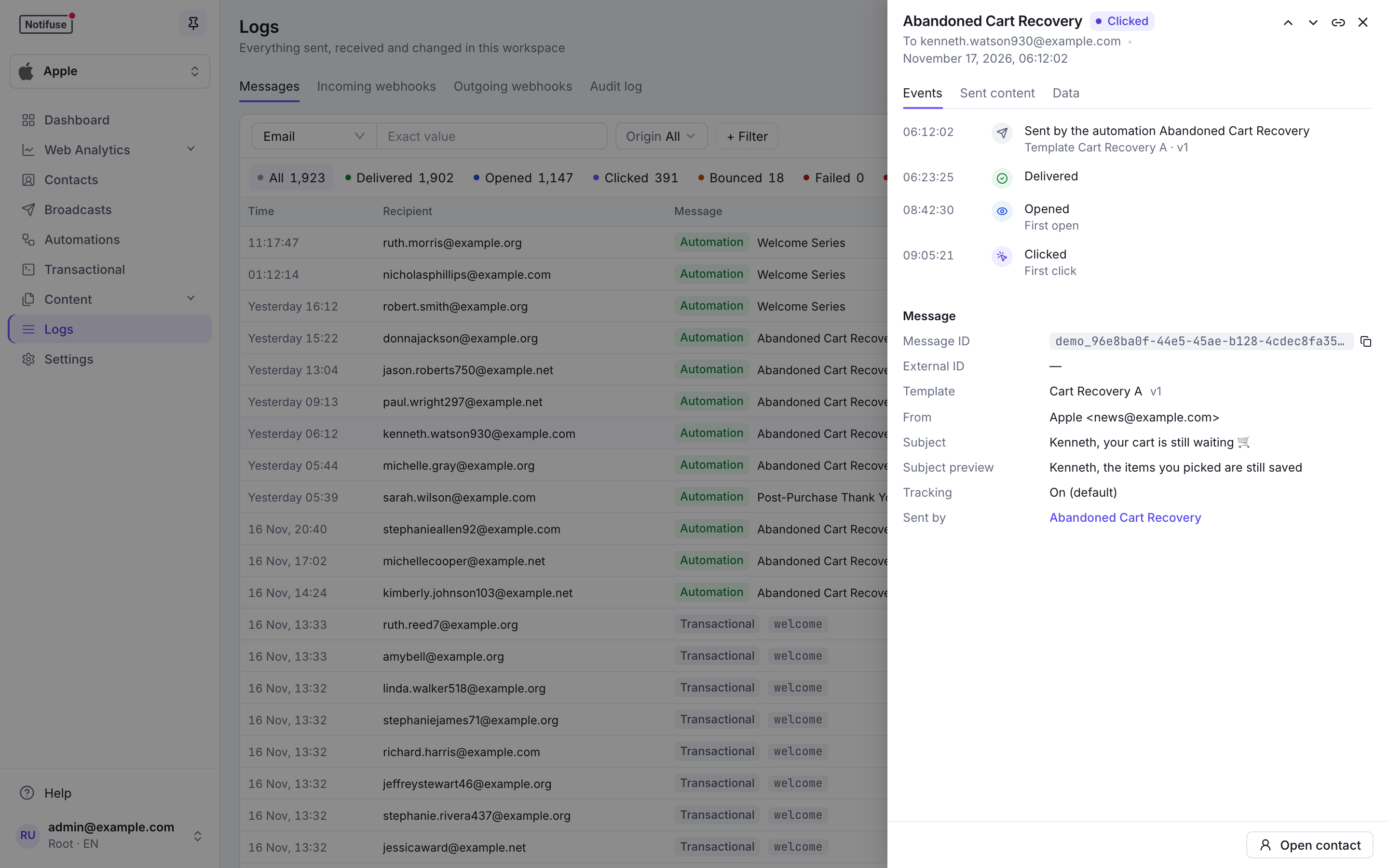
Send the same request a second time: the response returns the same message_id, and no second email appears in Logs.
Next steps
- Transactional API lists every request field, including
email_optionsfor reply-to, CC, BCC and attachments. - Build a welcome sequence for emails that follow a signup.
- Webhooks to get delivery and bounce events in your app.