Example:
- Newsletter Subscribers
- VIP Customers
- Event Attendees
- Product Updates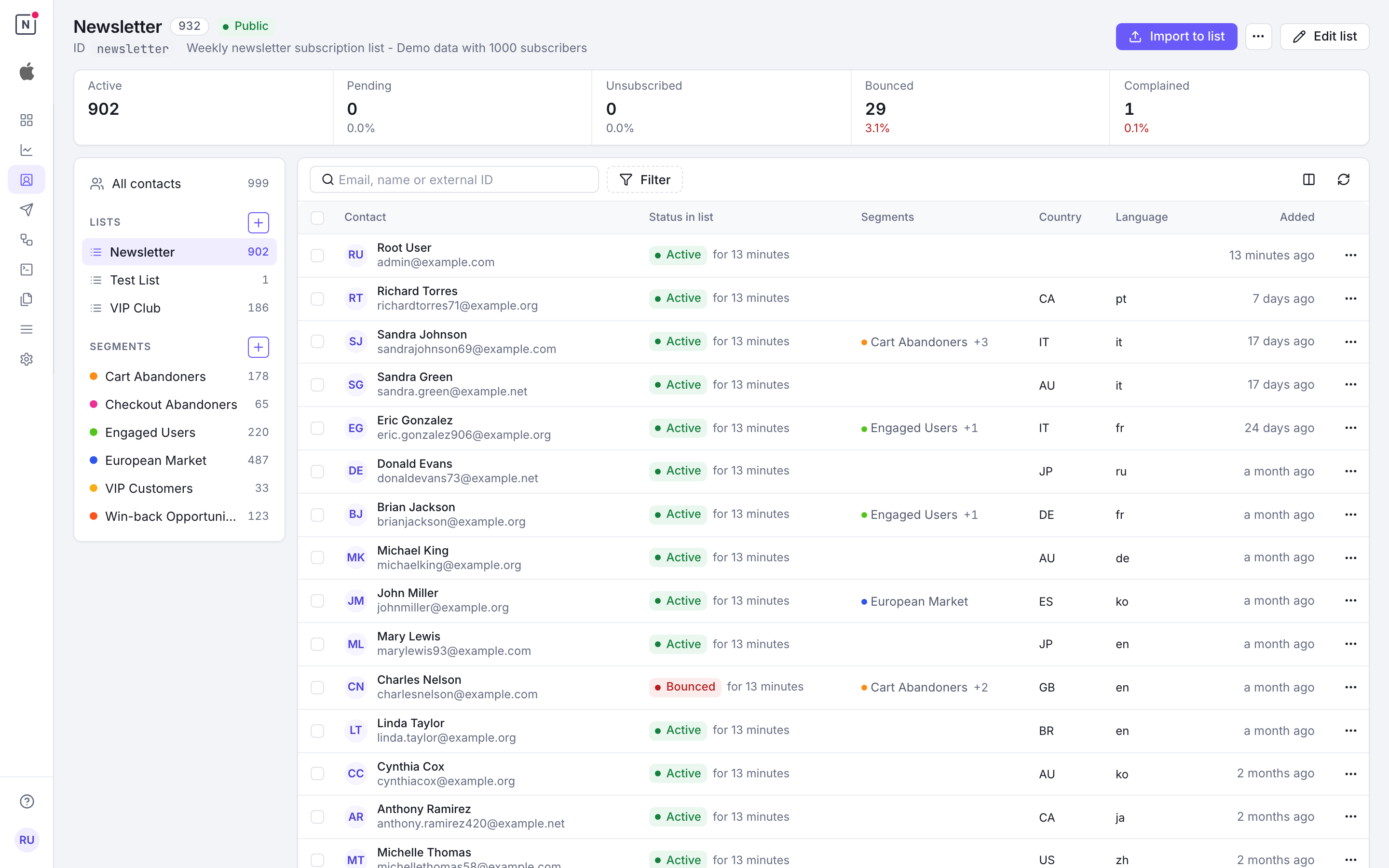
Lists in the Console
Lists live on the Contacts page, in its left rail under Lists; there is no separate Lists page. The + beside Lists creates one.
Selecting a list shows:
- Its subscriber counts by status: click one to show only those contacts. Unsubscribed, bounced and complained counts also show their share of the list.
- Its settings: visibility, double opt-in and its confirmation template, and the list ID. Edit list opens the form.
- Its members, with each one’s status in the list and since when.
Import to list imports a CSV straight into the list, and the … menu deletes it.
Contact Statuses
Contacts within lists can have different statuses that determine their engagement eligibility:
| Status | Email Delivery | Description |
|---|---|---|
| Active | ✅ Can receive emails | Confirmed subscribers eligible for broadcasts |
| Pending | ❌ Cannot receive emails | Waiting for double opt-in confirmation |
| Unsubscribed | ❌ Cannot receive emails | Opted out of receiving communications |
| Bounced | ❌ Never receives emails | Email address is invalid or unreachable |
| Complained | ❌ Never receives emails | Marked emails as spam |
Important: Broadcasts leave out the list’s unsubscribed contacts unless the broadcast sets
exclude_unsubscribedtofalse(Exclude unsubscribed recipients switched off in the console), for example for a security or legal notice. Such a broadcast’s emails carry noList-Unsubscribeheader, so mail clients show no Unsubscribe button on them. Leavingexclude_unsubscribedout of an API request means exclude them, as the console does. Bounced and complained contacts are never emailed, whatever that setting.
A contact who unsubscribes from an email sent for a list they weren’t on, such as an automation email, is recorded on that list as unsubscribed. An unsubscribe never replaces a bounced or complained status.
List Visibility
Public Lists
- Notification Center: ✅ Appear in the notification center
- Subscriber Access: Users can see and subscribe to these lists through your notification center
- Use Case: Ideal for newsletters, announcements, and general communications
Private Lists
- Notification Center: ❌ Not offered to contacts who aren’t on them. A contact sees a private list they are active or pending on, and can only leave it there.
- Subscriber Access: Only the workspace adds contacts, from the console or the authenticated API (
lists.subscribe). A contact can’t join a private list from the notification center or the public/subscribeendpoint, nor come back after leaving one. Adding them back is up to the workspace. A link from their emails only lets them confirm a pending double opt-in. - Use Case: Perfect for internal communications, VIP segments, transactional lists, or one-time broadcasts
Double Opt-In Configuration
Enabling Double Opt-In
When you activate double opt-in for a list:
- Imported Contacts: Contacts added via CSV import or API will always be “active” (they bypass double opt-in)
- Anonymous Subscribers: Users subscribing via forms (like a newsletter signup on your website) will be “pending”
- Confirmation Required: Pending contacts must click a confirmation link in their email to become “active”
- Compliance: Helps ensure GDPR compliance and reduces spam complaints
Example: A visitor fills out a newsletter form on your website → they receive a confirmation email → they click the link (which renders the notification center) → status changes from “pending” to “active”
Welcome Template (Optional)
- Purpose: Automatically sent to contacts when they become “active”
- Timing: Triggered after successful subscription or double opt-in confirmation
- Content: Welcome message, onboarding information, or subscription confirmation
Unsubscribe Template (Optional)
- Purpose: Automatically sent when contacts unsubscribe from the list
- Timing: Triggered immediately when a contact’s status changes to “unsubscribed”
- Content: Confirmation of unsubscription, feedback request, or alternative communication options
Re-subscription Handling
When a contact attempts to subscribe to a list they have previously interacted with, Notifuse handles the request based on their current status:
| Current Status | Behavior |
|---|---|
| Active | No-op. Contact is already subscribed. Returns success silently. |
| Pending | No status change. Re-sends the double opt-in confirmation email. |
| Unsubscribed | Allowed. Status is set to “pending” and a confirmation email is sent, even if the list uses single opt-in. |
| Bounced | Blocked. Status is not changed and no email is sent. |
| Complained | Blocked. Status is not changed and no email is sent. |
Why bounced and complained contacts are blocked
Re-sending emails to addresses that have previously hard-bounced or filed spam complaints damages sender reputation and can trigger domain blacklisting. These contacts are permanently suppressed at both the application and database level.
Bulk import behavior
When contacts are imported via CSV or the API with subscribe_to_lists, the same protections apply at the database level. Contacts with unsubscribed, bounced, or complained status will not have their list status overwritten. This prevents accidental reactivation of opted-out contacts through bulk operations.
Privacy by design
Public subscribe endpoints always return HTTP 200 regardless of the contact’s internal status. This prevents email enumeration attacks where an attacker could probe the endpoint to determine whether a specific email address is subscribed.
Permissions
Lists answer to the Lists permission: read shows lists, their settings and their subscriber counts, and write creates, edits and deletes them and manages subscriptions. Listing the actual member addresses of a list needs Contacts read as well, and changing or removing an existing subscription needs Contacts write as well.
In the console, a member with Lists read but not Contacts read still reaches the Contacts page: the rail shows the lists and their counts, but no contacts.
Warning
Lists write is an implicit Contacts write. Subscribing an address through /api/lists.subscribe
creates or overwrites that contact’s whole record, with every field the request carries, without
needing Contacts write — so a member or API key holding only Lists write can still rewrite your
contact data. An authenticated call can also subscribe someone to a list that is not public. Grant
Lists write only where you would grant Contacts write. See
Admins & API Keys.
Best Practices
- Status Management: Regularly review contact statuses to maintain list health
- Double Opt-In: Enable for compliance and to ensure engaged subscribers
- Template Setup: Configure welcome and unsubscribe templates for better user experience
- List Organization: Use separate lists for different audience types (e.g., “Newsletter”, “Product Updates”) and combine with segment filters for precise targeting in broadcasts