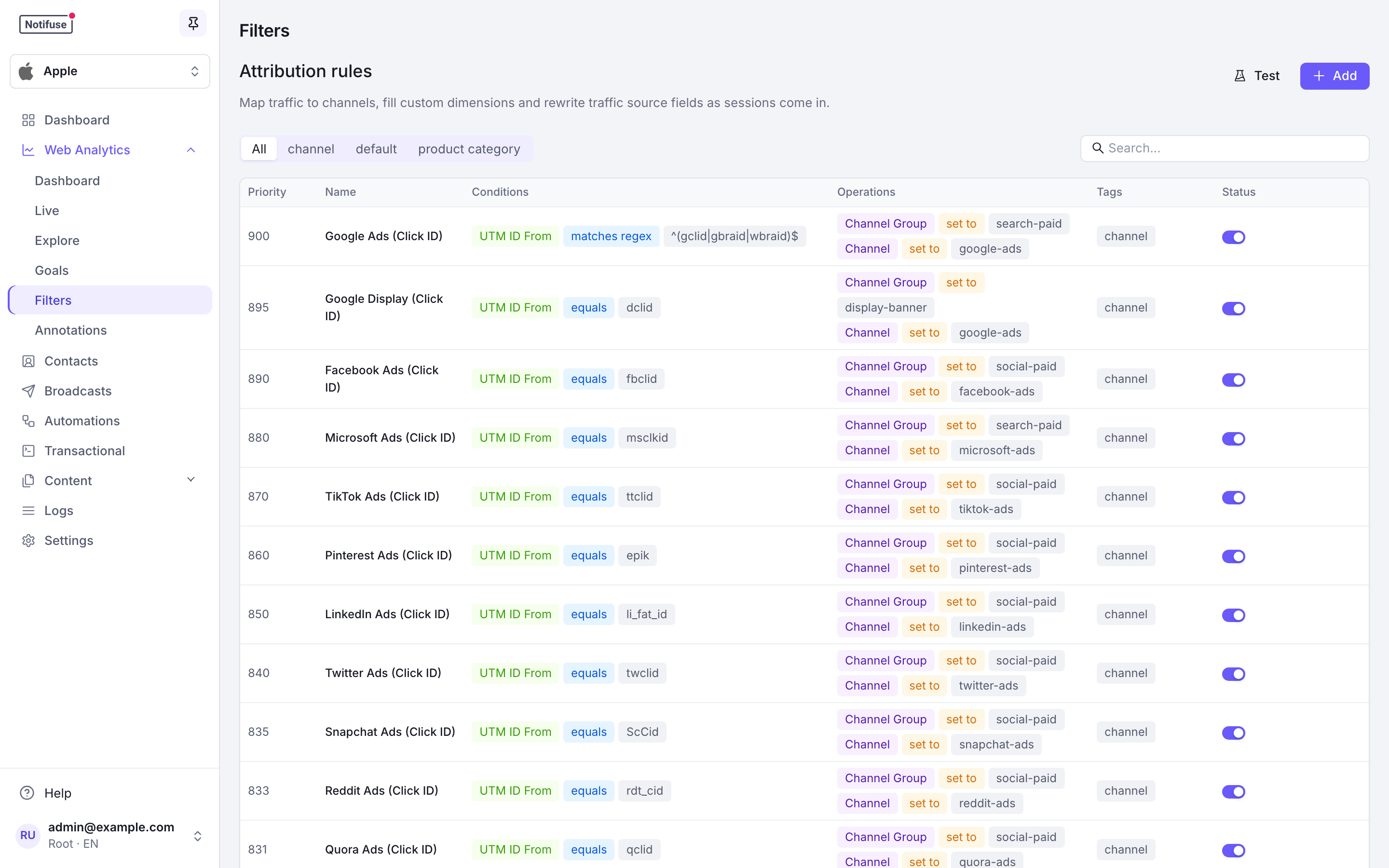
Every visit arrives with raw signals: a referrer, some UTM parameters, maybe an ad click ID. Attribution rules turn those into a Channel and a Channel Group you can report on.
Your own site is never one of those signals. A referrer on the same host as the page it led to is discarded and the visit is recorded as direct — a session ends after 30 minutes of inactivity, so a visitor who comes back to a tab, or clicks on to another page after a long read, starts a new session whose referrer is one of your own pages. Another host is a genuine referral and is kept: docs.example.com linking to www.example.com appears in your reports.
Default Rules
A new workspace starts with 40 rules covering paid search, paid social, paid video, display, organic search, organic social, email and direct. They are ordinary rules: you can edit or delete any of them.
| Priority | Family |
|---|---|
| 900–831 | Paid, identified by ad click ID |
| 830–770 | Paid, identified by a known UTM source together with a paid UTM medium |
| 760 | Paid display, identified by referrer |
| 750 | Direct, declared by utm_source=direct and utm_medium=none |
| 745 | |
| 740 | Direct traffic — no referrer and no campaign parameters |
| 705–650 | Organic search |
| 600–510 | Organic social |
| 10 | Fallback — not-mapped |
Note
Email sits above Direct Traffic deliberately. Many mail clients strip the referrer, so a click from an email otherwise looks like someone typing your address — which is why your broadcasts should carry UTM parameters.
Warning
There is no seeded rule for referral traffic. A plain link click from another site matches nothing and lands in not-mapped, by design: it surfaces in the Filters tab so you can classify those referrers once, rather than being quietly bucketed. Add your own rule on Referrer Domain when you want a referral channel.
For the same reason, the paid UTM rules require a known source as well as a paid medium — utm_medium=cpc from a network Notifuse does not ship a rule for falls through to not-mapped rather than being called paid.
How Rules Are Applied
Rules run by priority, highest first, and every matching rule contributes — evaluation does not stop at the first match.
Precedence is per target rather than per rule:
- For each target, the highest-priority rule that writes it wins.
- A lower-priority rule can still write a target no higher-priority rule claimed. A rule that only sets
custom_3therefore applies even when a higher-priority rule already set the channel. - Two matching rules at the same priority both run, and the later one overwrites — a tie goes to the last rule, not the first.
set as defaultnever claims a target, so a lower-prioritysetstill overrides a default written earlier. That is how the priority-10 fallback works.
Writing a Rule
A rule is a set of conditions and the values to write when they all match. All conditions of a rule must match for it to apply. A rule without conditions always matches, as the seeded Default Channel does, and can be saved that way.
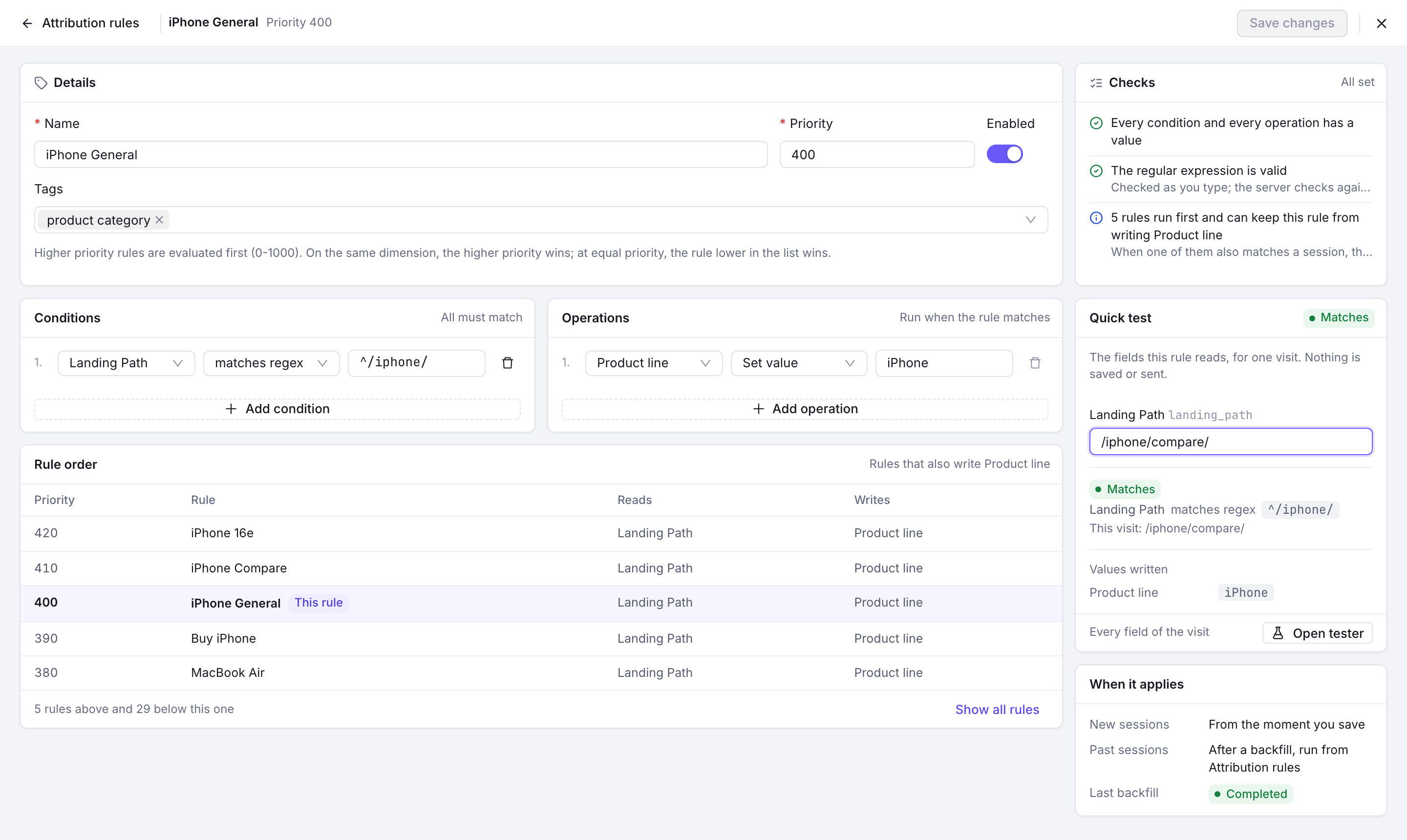
- Conditions test any tracked signal: the referrer, referrer domain and referrer path, is-direct, the landing page, domain and path, the current path, every UTM parameter and the ad click ID, plus device, browser, browser type, OS, user agent, connection type, language and timezone.
- Operators are
equals,not equals,contains,not contains,is empty,is not emptyandregex. - Operations then
seta value,setit only as a default where nothing else has written one, orunsetit. - Targets are Channel, Channel Group, any of the five UTM fields, Referrer Domain, Is Direct, and
custom_1throughcustom_10.
Writing a custom dimension from a rule is how you classify traffic you could not tag at the source — a partner’s referrer becomes a partner name, say, without asking them to add parameters.
The Rule Editor
Add or a rule’s edit button in the Filters tab opens the editor full width. The bar shows the rule’s name and priority, Unsaved changes once you edit it, and Discard and Save changes (Create rule for a new one).
- Details: name, priority from 0 to 1000, enabled, and tags.
- Conditions and Operations sit side by side on a wide screen.
- Rule order lists the rules that also write the dimensions this rule writes, in the order they run — highest priority first, equal priorities in list order — with what each reads and writes, two either side of this rule. Show all rules lists every one.
- Checks update as you type:
- whether every condition and every “set” operation has a value, and Always matches for a rule without conditions;
- each regular expression: valid, refused by the server (a lookaround or a backreference), not a valid regular expression and maybe refused on save, or written in a syntax only the server’s RE2 engine reads, such as
\A,\z,\Q…\E,\p{…},[[:alpha:]]or(?U). The browser can’t test that last kind; the server checks it on save; - the enabled rules that run first and can keep this rule from writing a dimension, and those that run later and can overwrite it. For a disabled rule, the check says instead that it does not run and writes nothing.
- Quick test asks only for the fields the rule reads, shows each condition’s result for that visit and the values the rule writes when it matches. Nothing is saved or sent. Open tester takes the visit to the rule tester.
- When it applies: new sessions from the moment you save, past sessions after a backfill, and the last backfill’s status.
Escape does not close the editor, and closing it with unsaved changes asks before discarding them. Members without write permission on Web Analytics open rules read only: the form is disabled, Save says why, and the Quick test still works.
Test Your Rules
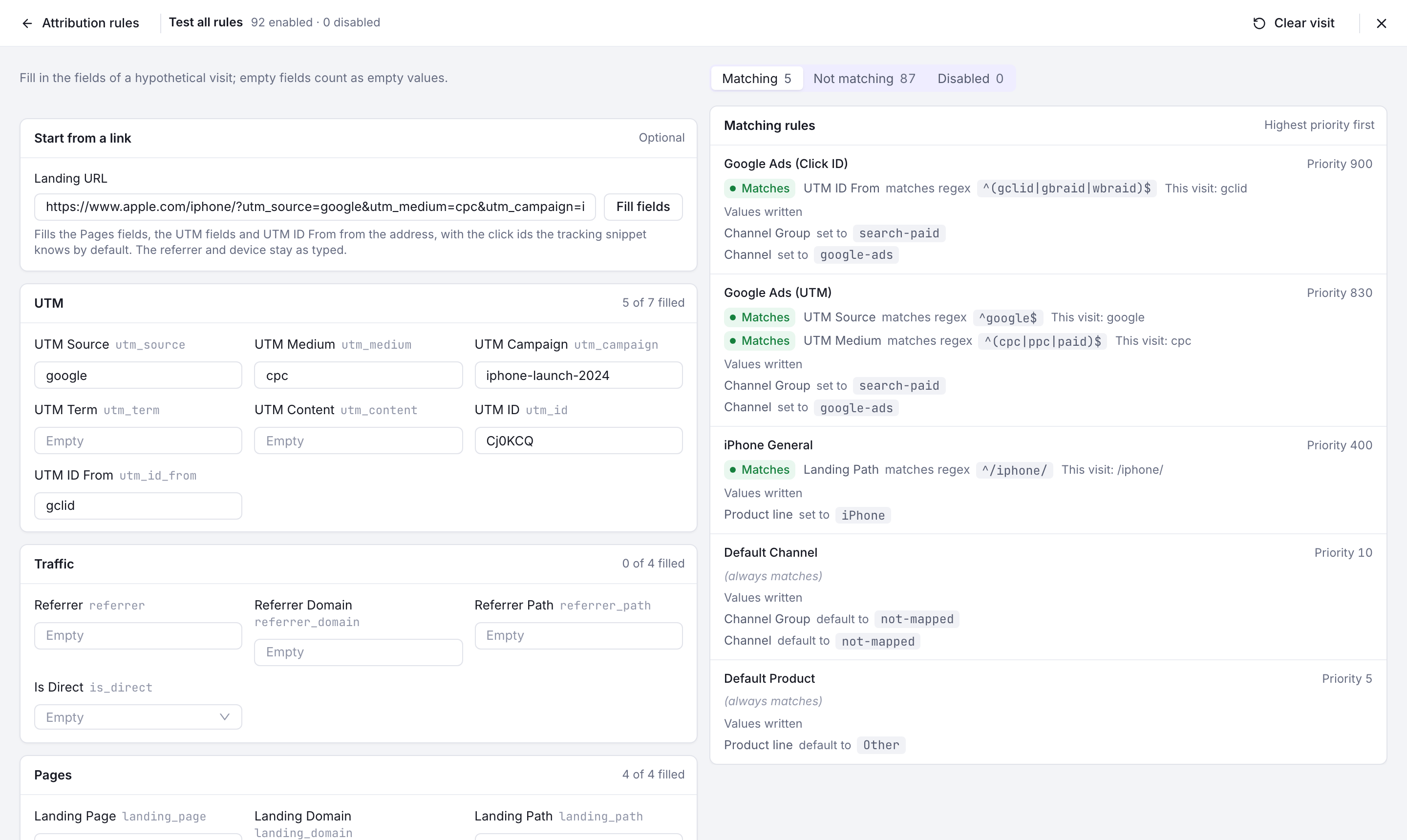
The tester runs a visit you describe through the rules in your browser, and updates the results as you type. Nothing is saved or sent. Test in the Filters tab runs every saved rule; Open tester in the editor runs the rule you are editing, unsaved changes included, starting from the Quick test’s values.
The visit’s fields are grouped by kind, with how many of each group you filled. Empty fields count as empty values. Clear visit empties them, and closing the tester forgets the visit.
Start from a link fills the fields from a landing URL: Landing Page, Landing Domain, Landing Path and Current Path, the five UTM parameters, and UTM ID and UTM ID From from the first ad click ID present. The referrer and device fields stay as you typed them.
- A link without a scheme is read as
https://. Anything other than an http or https address is refused. - Only the thirteen default click IDs are recognised, so a link carrying a click ID you added with
extraAdClickIdsleaves UTM ID empty here. Type it in yourself. - A
%not followed by two hexadecimal digits in the path or the fragment, such as/50%off, is a malformed link: the server can’t read it and records an empty landing domain and path, so the tester fills them empty too and says why.
Testing every rule sorts them into tabs, highest priority first, each with the result of every condition against the visit:
| Tab | Rules |
|---|---|
| Matching | Enabled rules whose conditions all match, with the values each one writes. |
| Not matching | Enabled rules with a condition that fails. |
| Can’t test | Enabled rules no condition rules out, but with a regular expression only the server reads. The tab only shows when a rule is in it. |
| Disabled | Rules that never run, whatever they would match. |
Note
The tester shows what each matching rule writes on its own. It does not apply precedence to give the final Channel or dimension values: when the fallback rule says “default to not-mapped” next to a rule that sets google-ads, the visit ends up as google-ads.
Ad Click IDs
The tracker recognises thirteen ad click ids on the landing URL, in this order:
gclid (Google Ads), fbclid (Meta), msclkid (Microsoft), dclid (Google
Display), twclid (X), ttclid (TikTok), li_fat_id (LinkedIn), wbraid and
gbraid (Google Ads), epik (Pinterest), ScCid (Snapchat), rdt_cid (Reddit)
and qclid (Quora).
The first one present lands in utm_id, and the parameter it came from in
utm_id_from — so a paid click is attributable even when the campaign forgot its
UTMs. “First” means first in that list, not first in the URL, so a link carrying
both gclid and fbclid is attributed to Google.
Matching ignores case: ?sccid=, ?ScCid= and ?SCCID= are all recognised, and
utm_id_from always records the canonical spelling above — which is what the
built-in rules match on.
Note
To capture a click id of your own in addition to those thirteen, set
extraAdClickIds: ['myclid'] in NotifuseAnalyticsConfig. adClickIds also
exists but replaces the list outright, and adClickIds: [] captures none —
use it only when that is what you want. A rule matching on utm_id_from only
ever fires for a parameter the tracker was told to capture.
Changing Rules Later
Rules are applied when a visit is recorded, so editing them changes what happens next, not what already happened. To apply them to existing traffic, run a backfill from the Filters tab.
A backfill rewrites the attribution columns on historical session and goal rows — which is what updates “revenue by channel” for past traffic. It never adds, removes or re-times traffic, and pageview rows are not touched at all.
Warning
A backfill clears Channel and Channel Group on any row its rules do not write. Those two exist only because a rule said so, so “no rule matches” means empty.
Custom dimensions are left alone, because your tracker can set them without any
rule being involved. A rule that targets one still rewrites the rows it matches,
and an unset_value rule still clears them — but a row no rule matches keeps
whatever your site sent. One consequence worth knowing: a custom value written by
a rule survives that rule’s deletion, since nothing can tell it from a
tracker-supplied one afterwards. Clear it with a temporary unset_value rule.
Warning
One backfill runs at a time, per workspace. Cancelling stops it where it is; the partitions already rewritten keep their new values, so a cancelled run leaves your data in a mixed state until you run it again.
Where the Traffic Comes From
Broadcasts add UTM parameters to their links — see Broadcast Campaigns → UTM Tracking. Those are exactly what the seeded Email rule looks for, so campaign traffic classifies itself with no extra work.
Notes
- Attribution is resolved per session, from the landing page. A visitor who arrives from a search and later clicks one of your emails starts a new session with its own attribution once the first has ended.
- Goals start from their session’s attribution, then re-run the rules with the goal’s own page path. A goal matches its session unless one of your rules tests the current path.
- The rule set is versioned by a hash the server recomputes on every save. The console compares it against the version of the last completed backfill to warn you when your history was attributed under a different rule set. A backfill rewrites every historical row, not just the stale ones.
- API Reference